If you create graphics for blog posts, social media, or WordPress websites, you’ve probably noticed that AI design tools are everywhere now. Two names come up again and again: Canva AI and Adobe Firefly. Both promise to help you create stunning visuals faster, but they take very different approaches to get you there.
In this guide, we’ll break down how Canva AI and Adobe Firefly actually work, compare their features side by side, and help you figure out which one fits your workflow best. Whether you’re a blogger, a small business owner, or a WordPress site owner looking to speed up content creation, this comparison will give you a clear picture.
Table of Contents
What Is Canva AI?
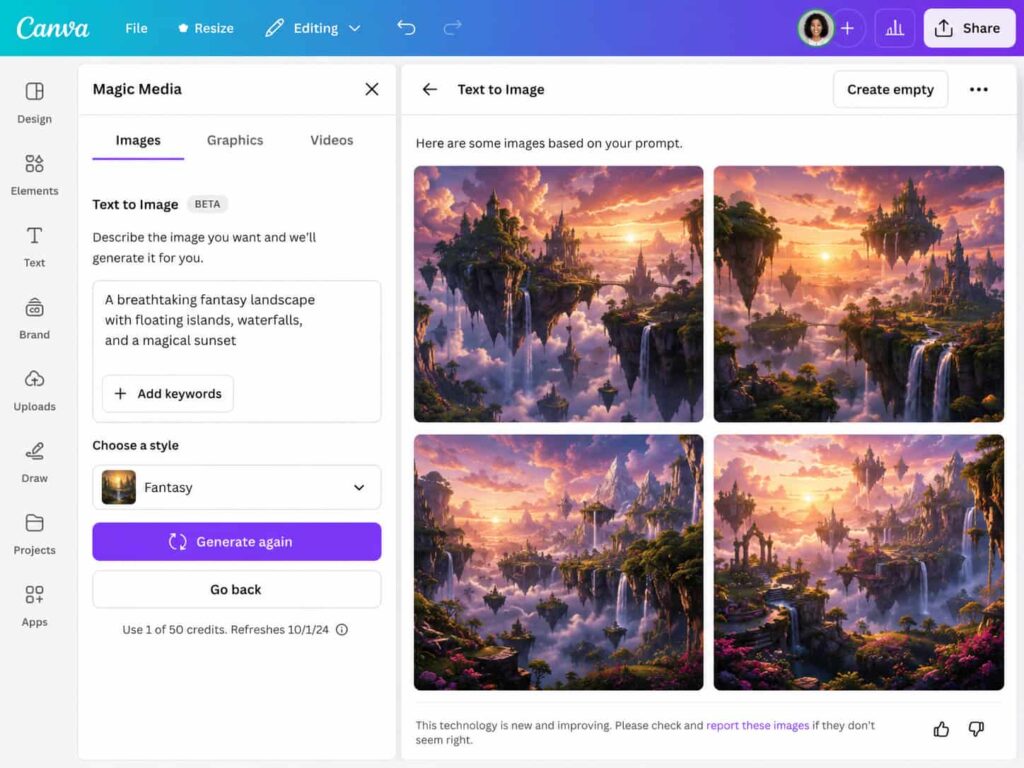
Canva AI is a set of artificial intelligence features built directly into Canva, the popular drag-and-drop design platform. Instead of being a standalone product, Canva AI lives inside the design editor you may already be using for social media graphics, presentations, and blog thumbnails.
Its core features include:
- Magic Media – generates images and videos from text prompts
- Magic Design – creates entire layouts based on a photo or prompt
- Magic Edit – lets you change parts of an image just by describing the change
- Background Remover – removes backgrounds instantly
- Text to Image – turns written descriptions into custom graphics
Because everything happens inside Canva’s existing editor, you can generate an AI image and then immediately drop it into a poster, Instagram post, or blog banner without switching apps.
What Is Adobe Firefly?
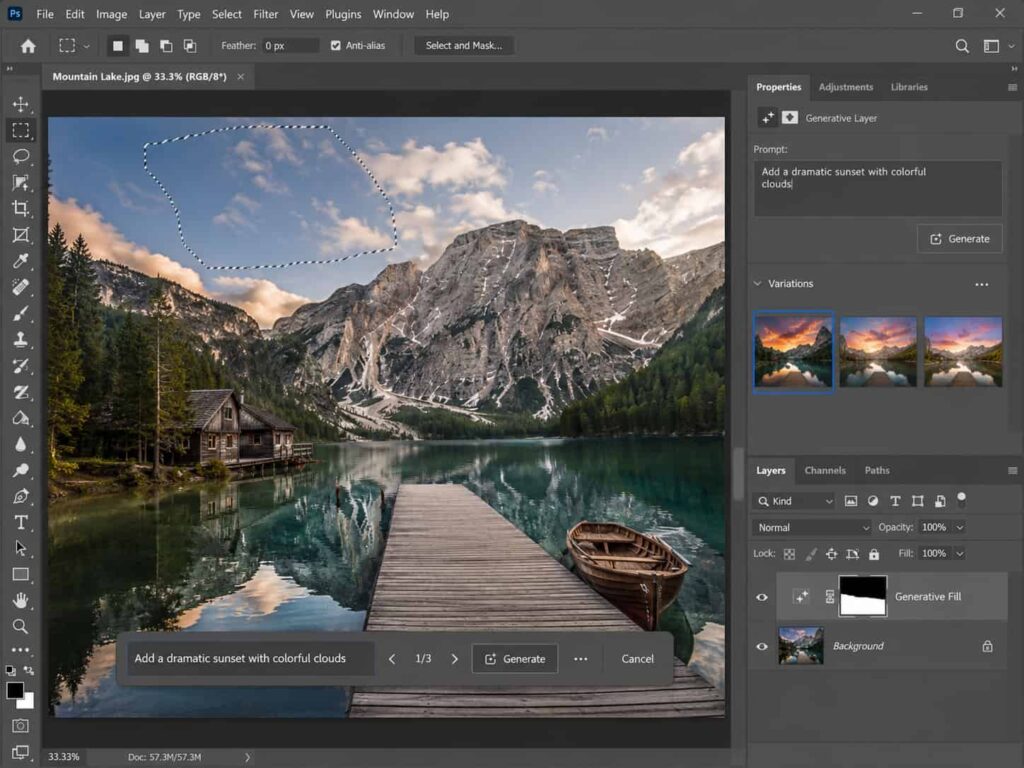
Adobe Firefly is Adobe’s family of generative AI models, designed to work both as a standalone web app and inside professional tools like Photoshop, Illustrator, and Premiere Pro. Firefly was built with commercial safety in mind, meaning it’s trained on licensed content, Adobe Stock images, and public domain material.
Key Firefly features include:
- Text to Image – generates images from prompts with fine-tuned style controls
- Generative Fill – fills or extends parts of an image seamlessly (a Photoshop favorite)
- Text Effects – applies AI-generated styles to typography
- Generative Recolor – recolors vector artwork in Illustrator
- Text to Template – builds design templates automatically
Firefly is aimed more at designers who already work inside Adobe’s Creative Cloud ecosystem and want AI features layered into their existing professional workflow.
Canva AI vs Adobe Firefly: Key Differences
| Feature | Canva AI | Adobe Firefly |
| Best for | Beginners, marketers, bloggers | Designers, Creative Cloud users |
| Learning curve | Very low | Moderate |
| Standalone app | Yes (Canva editor) | Yes, plus Creative Cloud integration |
| Commercial licensing | Included in paid plans | Built on licensed/stock training data |
| Vector editing support | Limited | Strong (via Illustrator) |
| Photo editing depth | Basic to intermediate | Advanced (via Photoshop) |
Ease of Use
This is where Canva AI has a clear edge. Canva was already known for being one of the easiest design tools on the market, and its AI features follow the same philosophy: type a prompt, click generate, and drag your result into a template. There’s almost no learning curve.
Adobe Firefly, on the other hand, rewards users who already understand basic design concepts like layers, selections, and masking. If you’re comfortable in Photoshop or Illustrator, Firefly’s generative tools feel like natural extensions of what you already do. If you’re brand new to design software, there’s more of an adjustment period.
AI Image Generation Quality
Both tools produce genuinely impressive results, but they shine in different scenarios.
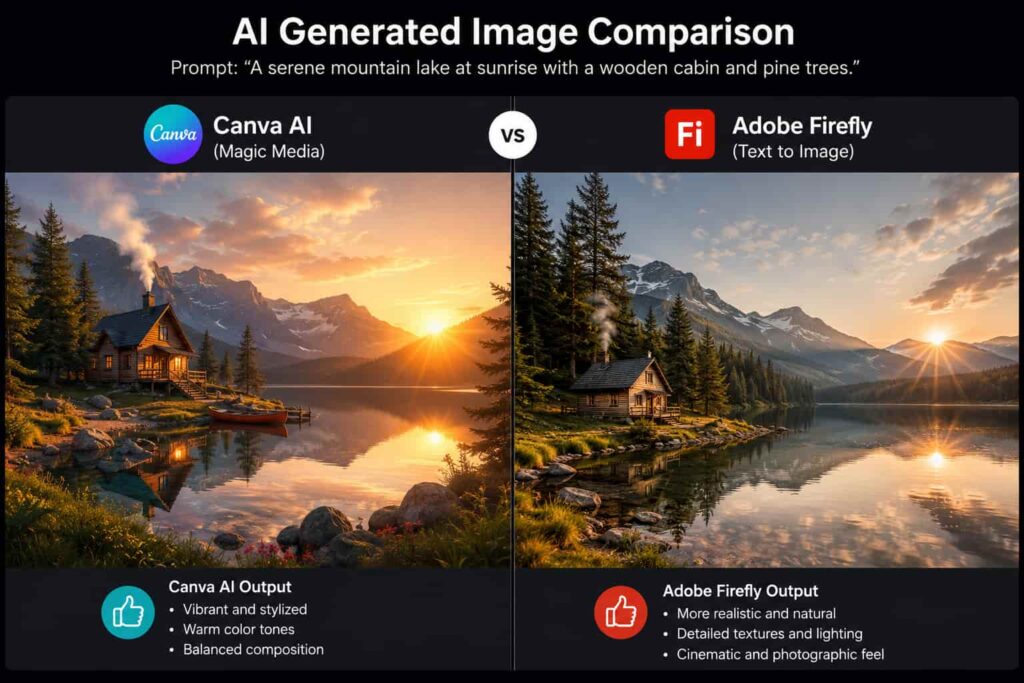
- Canva AI tends to produce clean, stylized, marketing-friendly graphics quickly. It’s great for social posts, blog headers, and quick mockups.
- Adobe Firefly often produces more photorealistic and artistically nuanced results, especially when paired with Photoshop’s generative fill for precise edits and extensions.
If your priority is speed and simplicity, Canva AI usually wins. If your priority is control and realism, Firefly tends to come out ahead.
Pricing Comparison
Canva AI features are bundled into Canva’s paid plans (Canva Pro and Canva for Teams), which also include access to templates, stock photos, and brand kits. This makes it a good value if you’re already using Canva for everyday design work.
Adobe Firefly offers a free tier with generation credits, plus paid plans that scale up, and it’s also included with many Creative Cloud subscriptions. If you’re already paying for Photoshop or Illustrator, Firefly effectively comes at no extra cost.
Because pricing structures change fairly often, it’s worth checking each company’s official pricing page before you commit to a plan.
Which One Should You Choose?
Here’s a simple way to decide:
- Choose Canva AI if you want a beginner-friendly, all-in-one tool for creating marketing graphics, blog thumbnails, and social media content quickly.
- Choose Adobe Firefly if you already use Creative Cloud apps and want AI tools that integrate deeply into professional photo and vector editing workflows.
- Consider using both if your work spans quick social graphics and more detailed photo editing many creators do exactly this.
How to Use Either Tool for Your WordPress Blog
If you run a WordPress site, both tools can help you produce better visuals for your posts. Here’s a simple step-by-step approach:
- Plan your image needs first. Decide what you need: a featured image, an infographic, or a social share graphic.
- Generate a base image. Use Canva AI’s Magic Media or Firefly’s Text to Image with a clear, descriptive prompt.
- Refine the image. Use Magic Edit (Canva) or Generative Fill (Firefly) to remove unwanted elements or extend the background to fit your blog’s featured image dimensions.
- Export at the right size. Most WordPress themes look best with featured images around 1200x630px for social sharing compatibility.
- Add descriptive alt text. This helps both accessibility and SEO describe what’s actually in the image using relevant keywords.
- Upload to your Media Library. Compress the image first if possible to keep your page load times fast.
If your site also uses AI tools elsewhere, you might enjoy our guide on how to make ChatGPT recommend your website, which pairs well with strong visual content for overall SEO performance.
FAQ
Is Canva AI free to use?
Canva offers some AI features on its free plan with limited credits, but full access requires a Canva Pro subscription.
Does Adobe Firefly cost extra if I already have Creative Cloud?
Many Creative Cloud plans include a set number of Firefly generative credits at no additional cost, though heavy usage may require a higher tier.
Can I use Canva AI or Adobe Firefly images commercially?
Both tools are designed with commercial use in mind, but licensing terms can vary by plan, so it’s a good idea to review the current terms on each platform before publishing commercial work.
Which tool is better for WordPress blog graphics specifically?
Canva AI is generally faster and easier for creating blog headers and social graphics, since it includes ready-made templates sized for common use cases.
Do I need design experience to use these tools?
Not for Canva AI, which is built for beginners. Adobe Firefly is also accessible, but you’ll get the most out of it if you have some familiarity with Photoshop or Illustrator basics. If you’re just starting out with design tools generally, browsing our WordPress tutorials can help you build a stronger foundation for managing your site’s visual content.
Conclusion
Both Canva AI and Adobe Firefly are excellent AI design tools, but they serve slightly different audiences. Canva AI is the friendlier, faster option for bloggers and marketers who want great-looking graphics without a steep learning curve. Adobe Firefly is the stronger choice for designers who want deep, professional-grade control within the Creative Cloud ecosystem.
There’s no single “winner” here the right tool depends on your skill level, your existing software, and the type of visuals your WordPress blog needs. Many creators end up using both, leaning on Canva AI for quick social content and Firefly for more detailed photo work.